
🎨 Developer: Custom Color Presets



✨ In one sentence: add one array entry to
rj_color_presets(), reload PHP, and your own admin color theme shows up in Settings → Colors.
Only want to change colors from the admin panel, with no code? Read the Colors guide instead.
📑 On this page
- Where presets live
- Preset structure
- Color format
- Step by step
- Ready-to-use presets
- Set a preset from code
- Updates will overwrite core files
- Troubleshooting
📍 Where presets live
Every color preset is defined in one place:
app/Helpers/rj.php → rj_color_presets()
Each key of the returned array is a preset ID. Each value is an array with a label and six RGB colors.
🧩 Preset structure
'my-preset' => [
    'label'        => 'My Preset',
    'purple'       => 'R G B',
    'purple-light' => 'R G B',
    'pink'         => 'R G B',
    'dark-1'       => 'R G B',
    'dark-2'       => 'R G B',
    'dark-3'       => 'R G B',
],
What each key controls
| Key | CSS variable | Where it shows | |
|---|---|---|---|
| 🟣 | purple |
--rj-purple |
Primary buttons, active nav items, links |
| 💜 | purple-light |
--rj-purple-light |
Hover states, lighter accents |
| 🌸 | pink |
--rj-pink |
Secondary accent, gradient end |
| ⚫ | dark-1 |
--rj-dark-1 |
Main dark background |
| 🌑 | dark-2 |
--rj-dark-2 |
Slightly lighter surface |
| 🌒 | dark-3 |
--rj-dark-3 |
Card / panel surface |
🏷️ The
labelis the name shown in the picker. The array key (for examplemy-preset) is what gets stored in theadmin_color_presetoption.
📝 The key names say purple and pink for historical reasons. They simply mean primary, primary (light) and secondary accent, whatever the real color is.
🔢 Color format
Colors are space-separated RGB integers (0–255). Not hex, not comma-separated, not rgb().
// ✅ Correct
'purple' => '124 58 237',

// ❌ Wrong, will not render
'purple' => '#7c3aed',
'purple' => '124,58,237',
'purple' => 'rgb(124,58,237)',
Hex → RGB by hand: split the hex into pairs and convert each one. #7c3aed → 7c=124, 3a=58, ed=237 → 124 58 237.
Hex → RGB with PHP: paste this anywhere (a tinker session works too):
[$r, $g, $b] = sscanf('#7c3aed', '#%02x%02x%02x');
echo "$r $g $b";   // 124 58 237
💡 Tip: keep
dark-1 < dark-2 < dark-3in brightness. The admin uses them as background, surface and card, so the steps between them create the depth.
🚀 Step by step
1️⃣ Open the helper file
Open app/Helpers/rj.php and find the rj_color_presets() function.
2️⃣ Add your preset
Insert a new entry next to the existing ones:
return [
    'purple' => [ /* ... */ ],

    // ... existing presets

    'ember' => [
        'label'        => 'Ember',
        'purple'       => '232 73 29',
        'purple-light' => '255 138 91',
        'pink'         => '13 148 136',
        'dark-1'       => '20 20 22',
        'dark-2'       => '33 33 36',
        'dark-3'       => '48 48 52',
    ],
];
3️⃣ Clear opcache
If PHP opcache is enabled, reload PHP-FPM (or clear opcache) so the new code is loaded.
| Hosting | What to do |
|---|---|
| Shared hosting | Saving the file is usually enough |
| VPS | systemctl reload php8.2-fpm (adjust the version) |
4️⃣ Select your preset
Open the admin panel → Settings → Colors. Your new preset now appears as a selectable card.
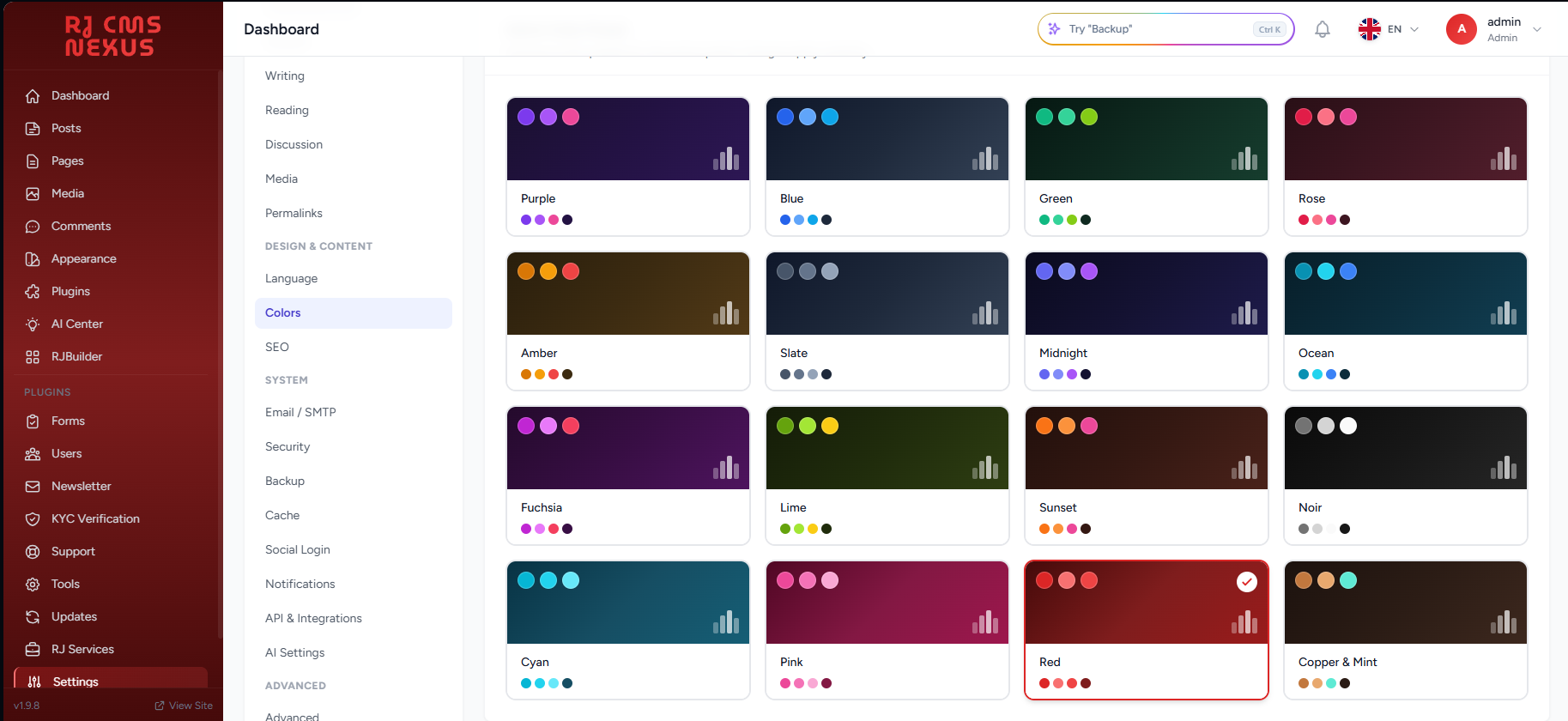
Settings → Colors: every preset is a card with a live color preview.
Select it and save. Admin colors update immediately. 🎉
🎁 Ready-to-use presets
Four presets that look nothing like the built-in ones. Each uses a hue range and a background family that the others do not, so they are easy to tell apart in the picker. Copy any of them into rj_color_presets().
| Preset | Idea | Primary | Light | Accent | Backgrounds |
|---|---|---|---|---|---|
| Ember 🔥 | Vermilion on neutral charcoal, teal accent |  #E8491D |
 #FF8A5B |
 #0D9488 |
   |
| Lime 🍋 | Acid lime on olive-black, citrus accent |  #65A30D |
 #BEF264 |
 #FACC15 |
   |
| Fuchsia 💖 | Neon magenta on plum-black, electric cyan accent |  #C026D3 |
 #E879F9 |
 #22D3EE |
   |
| Mono 🩶 | Silver on pure neutral black, no hue at all |  #71717A |
 #D4D4D8 |
 #F4F4F5 |
   |
📋 Copy the PHP for all four
'ember' => [
    'label'        => 'Ember',
    'purple'       => '232 73 29',
    'purple-light' => '255 138 91',
    'pink'         => '13 148 136',
    'dark-1'       => '20 20 22',
    'dark-2'       => '33 33 36',
    'dark-3'       => '48 48 52',
],
'lime' => [
    'label'        => 'Lime',
    'purple'       => '101 163 13',
    'purple-light' => '190 242 100',
    'pink'         => '250 204 21',
    'dark-1'       => '14 18 6',
    'dark-2'       => '26 33 10',
    'dark-3'       => '38 48 15',
],
'fuchsia' => [
    'label'        => 'Fuchsia',
    'purple'       => '192 38 211',
    'purple-light' => '232 121 249',
    'pink'         => '34 211 238',
    'dark-1'       => '24 6 30',
    'dark-2'       => '40 10 52',
    'dark-3'       => '58 14 74',
],
'mono' => [
    'label'        => 'Mono',
    'purple'       => '113 113 122',
    'purple-light' => '212 212 216',
    'pink'         => '244 244 245',
    'dark-1'       => '10 10 12',
    'dark-2'       => '24 24 27',
    'dark-3'       => '39 39 42',
],
⚡ Set a preset from code
To activate a preset without touching the UI:
rj_set_option('admin_color_preset', 'ember');
rj_flush_options();
The admin panel uses the new colors on the next request.
⚠️ Updates will overwrite core files
app/Helpers/rj.php is part of the core. When you update RJ Nexus this file is replaced, and your custom preset will be lost.
| Option | How |
|---|---|
| 📎 Keep a snippet | Store your preset code outside the project and re-add it after each update |
| 🌿 Use a branch | Keep your edits in a fork or a private branch |
| 🤝 Send a pull request | If the preset is useful to everyone, submit it to rj-nexus/rj-nexus so it ships in the next release |
💡
rj-content/themes/andrj-content/plugins/are never touched by core updates. A small plugin or a theme README is a safe place to keep your preset snippet.
🛠️ Troubleshooting
| Symptom | Likely cause | Fix |
|---|---|---|
| Preset does not appear in Settings → Colors | Old code is cached by opcache | Reload PHP-FPM or clear opcache |
| Colors look broken or unchanged | A color is not in R G B format |
Use space-separated integers, never hex or rgb() |
| Admin falls back to purple | The saved preset ID no longer exists | Pick a preset again in Settings → Colors or call rj_set_option() with a valid ID |
| Preset vanished after an update | rj.php was replaced by the new version |
Re-add your entry (see the section above) |
| Text is hard to read on buttons | purple is too light for white text |
Use a darker primary and keep the light shade in purple-light |
🔗 Related
- 📘 Colors: end-user guide for changing admin, frontend and theme colors from the UI